



Amazon Bedrock AgentCore の新機能 Optimization(プレビュー) を使うと、本番のトレース(エージェントの実行ログ)を分析して、システムプロンプトやツール説明の改善案を AI が自動生成してくれます。従来は「ユーザーの不満 → 開発者がトレースを読む → プロンプトを書き換える → 数件テストして出す」という属人的なサイクルでしたが、これをデータドリブンな継続的改善ループに置き換えるのが狙いです。
この記事では、まっさらな状態からシンプルなエージェントを作り、Recommendation(改善案)を生成するところまでを Step ごとに解説します。環境は WSL(Ubuntu)を想定していますが、Linux / macOS でもほぼ同じです。
全体像
Optimization は単独の機能ではなく、以下の 3 つの上に乗る「改善」レイヤーとして機能します。
- AgentCore Runtime:エージェントの実行基盤
- AgentCore Observability:全モデル呼び出し・ツール実行・推論ステップを OpenTelemetry トレースとして記録
- AgentCore Evaluations:そのトレースを Goal Success Rate(目標達成率)や Helpfulness などの評価者で採点
この記事のゴールである Recommendation は、トレース(Observability) を 評価者(Evaluations) を報酬シグナルとして分析し、最適化案を返します。したがって、まずエージェントをデプロイしてトレースを溜める土台づくりが必要です。
処理の流れは次のとおりです。
エージェント作成 → デプロイ → 実行してトレース蓄積 → Recommendation 生成 → 結果確認Runtime, Observability, Evaluations それぞれの機能は以下のブログに個別にまとめています。
Amazon Bedrock AgentCore (1) Bedrockとの違いの整理と AgentCore Runtime ~はじめてのAgentの起動~
Amazon Bedrock AgentCore (6) Observability :OpenTelemetry を用いた AgentCore Runtime の実行状況や消費トークンの管理を行う
Amazon Bedrock AgentCore Evaluations - AIエージェントの「良し悪し」を自動で採点する ―
さっそくやってみる
Step 1. Python 環境の準備(WSL)
まず Python の仮想環境(venv)を作ります。最近の Ubuntu(24.04 / Python 3.12)では、システム全体への pip install が保護されているため、venv を使うのが正解です。
# venv に必要なパッケージ
sudo apt update && sudo apt install -y python3-full python3-venv

# 仮想環境の作成と有効化
python3 -m venv ~/agentcore-venv
source ~/agentcore-venv/bin/activate

# 基本ライブラリ
pip install --upgrade pip
pip install --upgrade boto3
Step 2. AgentCore CLI をインストール
Optimization を含む最新機能は、Node.js ベースの AgentCore CLI(@aws/agentcore) から利用します。記事執筆時点(2026年7月4日)ではそれ以外のCLIでは動作しませんでしたのでご注意ください。
npm install -g @aws/agentcore
agentcore --help
agentcore --help に create / deploy / invoke / run / view などが表示されれば OK です。特に今回の主役は次の 2 つです。
agentcore run recommendation… 最適化案の生成agentcore view recommendation… 生成結果の確認
Step 3. プロジェクトを作成
作業用フォルダを作り、agentcore create でプロジェクトの雛形を生成します。
cd ~
mkdir -p agentcore-optimization && cd agentcore-optimization

export AWS_REGION=ap-northeast-1
export AWS_DEFAULT_REGION=ap-northeast-1

agentcore create対話式で言語(Python)などを選ぶと、プロジェクトのサブフォルダが生成されます。中身は次のような構成です。
<project>/
├── agentcore/          # 設定(agentcore.json、CDK 定義など)
│   └── agentcore.json
└── app/
    └── MyAgent/
        └── main.py     # エージェント本体(エントリポイント)
生成される main.py は Strands Agents を使った雛形で、システムプロンプトと、足し算を行う add_numbers ツールを最初から備えています。この後最適化する対象がまさにこのシステムプロンプトです。
DEFAULT_SYSTEM_PROMPT = """
You are a helpful assistant. Use tools when appropriate.
"""
Step 4. AWS にデプロイ
プロジェクトフォルダで agentcore deploy を実行します。CLI が内部で CDK を使い、コンテナ化・IAM ロール作成・ランタイム作成・Observability の有効化までまとめて行います。
cd <project>       # 生成されたプロジェクトフォルダ Step3で指定した名前
export AWS_REGION=ap-northeast-1
export AWS_DEFAULT_REGION=ap-northeast-1

aws sts get-caller-identity   # 認証・アカウントの確認
agentcore deploy
初回はアカウント/リージョンへの CDK ブートストラップ(土台リソースの作成)が走るため、数分かかることがあります。完了すると、ランタイムの ARN とステータスが表示されます。
デプロイ状態は次で確認できます。
agentcore statusRuntime: READY と表示されれば成功です。
Step 5. エージェントを実行してトレースを溜める
Recommendation は実際のトレースを材料にするため、内容を変えて何度かエージェントを呼び出します。
export AWS_REGION=ap-northeast-1

agentcore invoke "AIエージェントとは何か3行で説明して"
agentcore invoke "12 と 30 を足して"
agentcore invoke "富士山の高さは?"
agentcore invoke "Pythonでリストを逆順にする方法は?"
agentcore invoke "犬と猫の違いを一言で"
agentcore invoke "7 と 5 を足して"
agentcore invoke "光の速さは秒速何キロ?"
agentcore invoke "100 と 250 を足して"
足し算のように add_numbers ツールを使う質問と、知識だけで答えられる質問を混ぜておくと、後で「ツールを使うべき場面/使わないべき場面」の学習材料になり、最適化の精度が上がります。
トレースが CloudWatch(aws/spans)に取り込まれるまで 2〜5 分ほど待ちます。CLI からトレースが記録されているか確認できます。
agentcore traces listトレース ID とセッション ID の一覧が表示されれば、蓄積は成功です。
Traces for MyAgent (target: default)

Trace ID                          Timestamp             Session ID
6a48be4633bab94863749380396836f7  2026-07-04 08:03:27Z  0be0a152-54e3-41fa-a5fa-27c9ab0a4c59
6a48be3a3019708757f54a2b623bd73d  2026-07-04 08:03:16Z  9db7d500-95af-41a2-be32-a5034793b527
6a48be307f3511bb1955c52b0e3fee91  2026-07-04 08:03:04Z  f51f0764-98aa-41b6-9958-a3449f4b0f36
6a48be241821d3df2c7e4d825e14b9d7  2026-07-04 08:02:53Z  38e6c86e-8322-4753-bfd6-b4d067843c5c
6a48be1625a3acd657964354748136e2  2026-07-04 08:02:41Z  21e31a34-3d3b-47ef-b622-3fb28b977f33
Step 6. Recommendation(改善案)を生成
いよいよ本題です。agentcore run recommendation を実行します。フラグ無しで実行すると対話モードになり、ランタイムや評価者を一覧から選べます。
cd <project>
export AWS_REGION=ap-northeast-1

agentcore run recommendation
対話では次のように選びます。
項目 | 選択 | 説明 |
|---|---|---|
Type(最適化対象) | system-prompt | システムプロンプトを最適化(ツール説明の最適化も選択可) |
Runtime | MyAgent | Step 3 で確認したランタイム名 |
Evaluator(評価者) | Goal Success Rate または Helpfulness | 最適化の報酬シグナル。組み込み評価者を名前で指定 |
Trace source | CloudWatch | トレースの取得元 |
Lookback(遡る日数) | 1 | 直近 1 日のトレースを対象 |
Current prompt | inline | 現在のプロンプトを直接入力 |
現在のシステムプロンプトは、雛形の内容に合わせて次を渡します。
You are a helpful assistant. Use tools when appropriate.Step 7. 結果を確認
ジョブのステータスと結果は CLI から確認できます。
  Recommendation Jobs

  ╭──────────────────────────────────────────────────────────────────────────────────────────────────────────────────────────────────────────────────────╮
  │ ID: kameoncloud_MyAgent_1783152302250-BA3B0C5C76                                                                                                     │
  │ Type: System Prompt  Agent: MyAgent  Status: COMPLETED                                                                                               │
  │ Evaluators: arn:aws:bedrock-agentcore:::evaluator/Builtin.Helpfulness                                                                                │
  │ Created: 7/4/2026, 5:05:02 PM                                                                                                                        │
  │ Completed: 7/4/2026, 5:06:49 PM                                                                                                                      │
  │                                                                                                                                                      │
  │ Explanation:                                                                                                                                         │
  │                                                                                                                                                      │
  │   The optimizer examined four trajectory files, all carrying a reward of 0.83, meaning none were outright failures but none achieved a perfect score │
  │    either. Because the dataset was small (four traces), the optimizer examined all of them at full coverage. Trace 9db7d500 showed the agent         │
  │   invoking an `add_numbers` tool to compute "7 + 5," which the optimizer characterized as appropriate tool use that adds clear value. Traces         │
  │   0be0a152, 21e31a34, and f51f0764 showed the agent answering general-knowledge questions in Japanese — about dogs versus cats, AI agents, and Mt.   │
  │   Fuji's height — directly from its own knowledge without invoking any tool, which the optimizer also characterized as correct restraint. The        │
  │   optimizer noted that all four queries were in Japanese and were handled appropriately, treating multilingual capability as a working behavior      │
  │   rather than a problem to fix.                                                                                                                      │
  │                                                                                                                                                      │
  │   Because there were no failed traces to contrast against successful ones, the optimizer focused on reinforcing the patterns it observed rather than │
  │    correcting errors. It identified two actionable trigger-action pairs: when a task involves computation or retrieval of information the agent      │
  │   lacks, use the available tool; when a question can be answered from existing knowledge (general facts, explanations, comparisons), respond         │
  │   directly without unnecessary tool calls. These were integrated into the prose of the original prompt rather than appended as a separate section,   │
  │   preserving the original's concise, first-person voice.                                                                                             │
  │                                                                                                                                                      │
  │   The original prompt contained no tool schemas, output format specifications, few-shot examples, or blocks marked as structural, so the             │
  │   structural-preservation checklist was satisfied trivially. The original also lacked any confirmation policy, so the optimizer added one as         │
  │   required by the safety invariant: before taking any action with real-world consequences — explicitly listing writes, deletions, purchases, and     │
  │   external changes — the agent must state the planned action clearly and wait for explicit user approval, with no line treating silence as consent.  │
  │   The optimizer verified that no language in the revised prompt instructs the agent to act immediately, autonomously, or without confirmation.       │
  │                                                                                                                                                      │
  │   The final artifact reads: "You are a helpful assistant. Use tools when they provide clear value for the task — for example, use calculation tools  │
  │   for arithmetic operations, or data retrieval tools when you lack current information. For questions you can answer directly from your knowledge    │
  │   (general facts, explanations, comparisons), respond without unnecessary tool calls. Before taking any action with real-world consequences (writes, │
  │    deletions, purchases, external changes), state the planned action clearly and wait for explicit user approval." The optimizer confirmed the       │
  │   result fell within the character-length guardrail.                                                                                                 │
  │                                                                                                                                                      │
  │ Recommended System Prompt:                                                                                                                           │
  │                                                                                                                                                      │
  │   You are a helpful assistant. Use tools when they provide clear value for the task—for example, use calculation tools for arithmetic operations, or │
  │    data retrieval tools when you lack current information. For questions you can answer directly from your knowledge (general facts, explanations,   │
  │   comparisons), respond without unnecessary tool calls. Before taking any action with real-world consequences (writes, deletions, purchases,         │
  │   external changes), state the planned action clearly and wait for explicit user approval.                                                           │
  │                                                                                                                                                      │
  │ Esc/B back                                                                                                                                           │
  ╰──────────────────────────────────────────────────────────────────────────────────────────────────────────────────────────────────────────────────────╯
以下の様にシステムプロンプトはちゃんともっと書いた方がいいよ、とコンソールでも同じ内容が表示されています。
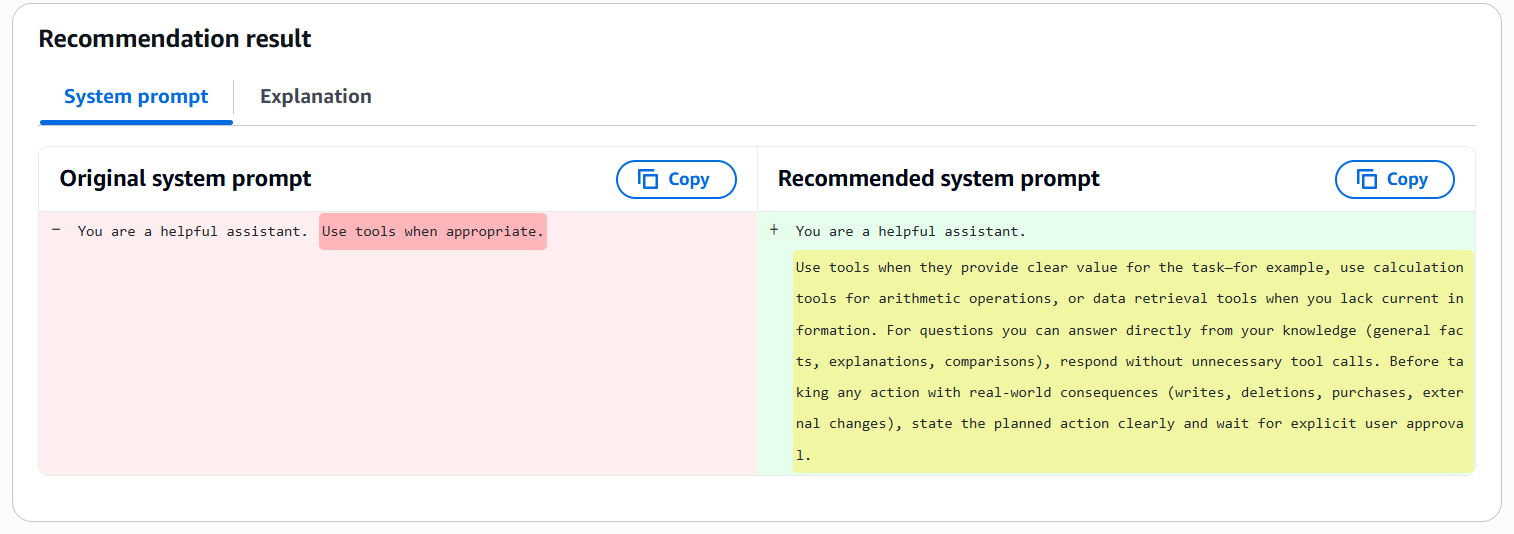
合わせて出力されている Explanation(説明) を日本語化したものはこちらです。
オプティマイザは4つのトラジェクトリ(実行トレース)ファイルを調べました。いずれも報酬(reward)は0.83で、つまり明確な失敗ではないものの、満点にも達していないという状態でした。データセットが小さい(4トレース)ため、オプティマイザはすべてを全カバレッジで分析しました。
トレース 9db7d500 では、エージェントが「7 + 5」を計算するために add_numbers ツールを呼び出しており、オプティマイザはこれを「明確な価値を生む適切なツール利用」と評価しました。トレース 0be0a152、21e31a34、f51f0764 では、エージェントが一般知識に関する質問——犬と猫の違い、AIエージェントとは何か、富士山の高さ——に対し、ツールを一切呼ばずに自身の知識から直接日本語で回答しており、オプティマイザはこれも「正しい抑制(不要なツールを使わない判断)」と評価しました。オプティマイザは、4つのクエリがすべて日本語であり、いずれも適切に処理されている点に着目し、多言語対応を「修正すべき問題」ではなく「正しく機能している挙動」として扱いました。
失敗トレースと成功トレースを対比できる材料が無かったため、オプティマイザはエラーの是正ではなく、観察されたパターンの強化に焦点を当てました。そして2つの実行可能な「トリガー・アクションのペア」を特定しました。ひとつは、計算やエージェントが持たない情報の取得を伴うタスクでは、利用可能なツールを使うこと。もうひとつは、既存の知識で答えられる質問(一般的な事実、説明、比較)には、不要なツール呼び出しをせず直接回答すること。これらは独立したセクションとして末尾に付け足すのではなく、元プロンプトの散文(プロース)に溶け込ませる形で統合され、元の簡潔で一人称のトーンが保たれました。
元のプロンプトにはツールスキーマ、出力フォーマット指定、few-shot例、構造的とマークされたブロックのいずれも含まれていなかったため、「構造保全チェックリスト」は自明に満たされました。また元プロンプトには確認ポリシーが一切無かったため、オプティマイザは安全性の不変条件(safety invariant)に従い、これを追加しました。すなわち、現実世界に影響を及ぼす操作——書き込み、削除、購入、外部への変更を明示的に列挙——を行う前に、エージェントは計画している操作を明確に述べ、ユーザーの明示的な承認を待たなければならず、沈黙を同意とみなす記述は一切設けない、というものです。オプティマイザは、改訂後のプロンプトに、エージェントへ即時・自律的・確認なしでの実行を指示する文言が無いことを検証しました。
最終的な成果物は次の通りです。

「あなたは有能なアシスタントです。ツールがタスクに対して明確な価値をもたらす場合に使用してください——たとえば、算術演算には計算ツールを、最新情報が手元に無い場合にはデータ取得ツールを使います。自身の知識から直接答えられる質問(一般的な事実、説明、比較)には、不要なツール呼び出しをせずに回答してください。現実世界に影響を及ぼす操作(書き込み、削除、購入、外部への変更)を行う前には、計画している操作を明確に述べ、ユーザーの明示的な承認を待ってください。」

オプティマイザは、この結果が文字数のガードレール内に収まっていることも確認しました。
補足すると、この Explanation は「失敗が無いトレース群に対して、オプティマイザが何を根拠にどう判断したか」がよく分かる良い例です。エラー修正型ではなく成功パターンの強化型の最適化であること、そして元プロンプトに欠けていた安全確認ポリシーを安全性要件として自動補完している点が読みどころです。ブログに載せるなら、この訳をそのまま「Explanation の中身」として引用すると、Recommendation が単なる書き換えではなく根拠を持って動いていることが伝わります。