



前回の記事で AWS Emulator を試してみました。非常に高速かつクレデンシャル不要でAWS環境を構築してテストが行えるため便利ですが一つ注意点があります。構築された環境はメモリ上に展開されるためターミナルを閉じるを環境が消えてしまいます。
調べてみましたが現時点で作成したエミュレーション環境の永続化オプションは無いようでした。このため作業の再開には毎回環境構築を行う必要があります。生のAWS CLIコマンドを呼ぶよりはやはりCloudFromationのスタックなどで固めたほうが便利だと思います。
さっそくやってみる
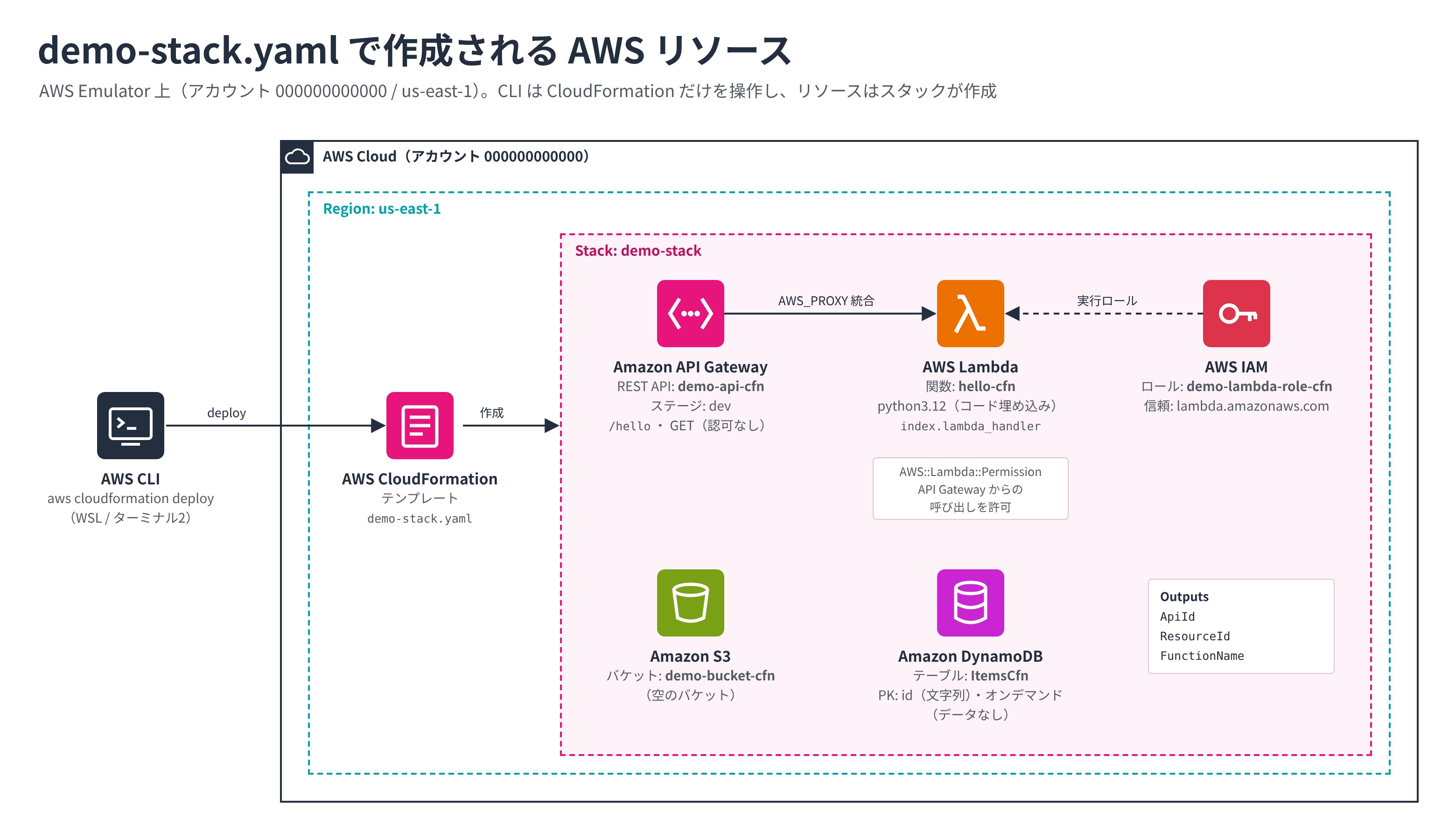
まず demo-stack.yaml を作成します。
AWSTemplateFormatVersion: "2010-09-09"
Description: smoke-test.sh と同じ構成(S3 / DynamoDB / IAM / Lambda / API Gateway)を CloudFormation で作る

Resources:
  DemoBucket:
    Type: AWS::S3::Bucket
    Properties:
      BucketName: demo-bucket-cfn

  ItemsTable:
    Type: AWS::DynamoDB::Table
    Properties:
      TableName: ItemsCfn
      BillingMode: PAY_PER_REQUEST
      AttributeDefinitions:
        - AttributeName: id
          AttributeType: S
      KeySchema:
        - AttributeName: id
          KeyType: HASH

  LambdaRole:
    Type: AWS::IAM::Role
    Properties:
      RoleName: demo-lambda-role-cfn
      AssumeRolePolicyDocument:
        Version: "2012-10-17"
        Statement:
          - Effect: Allow
            Principal: { Service: lambda.amazonaws.com }
            Action: sts:AssumeRole

  HelloFunction:
    Type: AWS::Lambda::Function
    Properties:
      FunctionName: hello-cfn
      Runtime: python3.12
      Handler: index.lambda_handler
      Role: !GetAtt LambdaRole.Arn
      Code:
        ZipFile: |
          import json
          def lambda_handler(event, context):
              return {"statusCode": 200,
                      "headers": {"Content-Type": "application/json"},
                      "body": json.dumps({"message": "hello from cfn lambda", "path": event.get("path")})}

  DemoApi:
    Type: AWS::ApiGateway::RestApi
    Properties:
      Name: demo-api-cfn

  HelloResource:
    Type: AWS::ApiGateway::Resource
    Properties:
      RestApiId: !Ref DemoApi
      ParentId: !GetAtt DemoApi.RootResourceId
      PathPart: hello

  HelloGet:
    Type: AWS::ApiGateway::Method
    Properties:
      RestApiId: !Ref DemoApi
      ResourceId: !Ref HelloResource
      HttpMethod: GET
      AuthorizationType: NONE
      Integration:
        Type: AWS_PROXY
        IntegrationHttpMethod: POST
        Uri: !Sub arn:aws:apigateway:${AWS::Region}:lambda:path/2015-03-31/functions/${HelloFunction.Arn}/invocations

  ApiInvokePermission:
    Type: AWS::Lambda::Permission
    Properties:
      FunctionName: !Ref HelloFunction
      Action: lambda:InvokeFunction
      Principal: apigateway.amazonaws.com

  ApiDeployment:
    Type: AWS::ApiGateway::Deployment
    DependsOn: HelloGet
    Properties:
      RestApiId: !Ref DemoApi
      StageName: dev

Outputs:
  ApiId:
    Value: !Ref DemoApi
  ResourceId:
    Value: !Ref HelloResource
  FunctionName:
    Value: !Ref HelloFunction
では実行してみます。
source ./emulator-env.sh

aws cloudformation deploy --template-file demo-stack.yaml \
  --stack-name demo-stack --capabilities CAPABILITY_NAMED_IAM

aws cloudformation describe-stacks --stack-name demo-stack \
  --query 'Stacks[0].{status:StackStatus,outputs:Outputs}'

# できたリソースの確認
aws s3 ls
aws lambda invoke --function-name hello-cfn out.json && cat out.json

# 片付け
aws cloudformation delete-stack --stack-name demo-stack
Successfully created/updated stack - demo-stack
{
"status": "CREATE_COMPLETE",
"outputs": [
{
"OutputKey": "ApiId",
"OutputValue": "eocd2yo7iw"
},
{
"OutputKey": "ResourceId",
"OutputValue": "ab2cjd"
},
{
"OutputKey": "FunctionName",
"OutputValue": "hello-cfn"
}
]
}
2026-11-14 10:04:30 demo-bucket-cfn
{
"StatusCode": 200,
"ExecutedVersion": "$LATEST"
}
{"statusCode": 200, "headers": {"Content-Type": "application/json"}, "body": "{\"message\": \"hello from cfn lambda\", \"path\": null}"}無事環境構築とLambda呼び出しまで完了しています。
CDK の実行
CloudFormaronが使えるということはもちろんCDKも使えます。
まずはターミナル1でEmulatorを起動します。
aws-emulator --telemetry offターミナル2を開きCDKのプロジェクトを初期化します。
mkdir cdk-demo && cd cdk-demo
npx aws-cdk@latest init app --language typescript
次に ./lib/cdk-demo-stack.ts を書き換えます。
import * as cdk from 'aws-cdk-lib/core';
import { Construct } from 'constructs';
import * as s3 from 'aws-cdk-lib/aws-s3';
import * as dynamodb from 'aws-cdk-lib/aws-dynamodb';
import * as iam from 'aws-cdk-lib/aws-iam';
import * as lambda from 'aws-cdk-lib/aws-lambda';
import * as apigw from 'aws-cdk-lib/aws-apigateway';

// smoke-test.sh / demo-stack.yaml と同じ構成を CDK で書いたもの
export class CdkDemoStack extends cdk.Stack {
  constructor(scope: Construct, id: string, props?: cdk.StackProps) {
    super(scope, id, props);

    // S3 バケット(cdk destroy で消せるように DESTROY を指定)
    new s3.Bucket(this, 'DemoBucket', {
      bucketName: 'demo-bucket-cdk',
      removalPolicy: cdk.RemovalPolicy.DESTROY,
    });

    // DynamoDB テーブル
    new dynamodb.Table(this, 'ItemsTable', {
      tableName: 'ItemsCdk',
      partitionKey: { name: 'id', type: dynamodb.AttributeType.STRING },
      billingMode: dynamodb.BillingMode.PAY_PER_REQUEST,
      removalPolicy: cdk.RemovalPolicy.DESTROY,
    });

    // Lambda の実行ロール
    const role = new iam.Role(this, 'LambdaRole', {
      roleName: 'demo-lambda-role-cdk',
      assumedBy: new iam.ServicePrincipal('lambda.amazonaws.com'),
    });

    // Lambda 関数(コードはテンプレートに埋め込む=アセットのアップロード不要)
    const fn = new lambda.Function(this, 'HelloFunction', {
      functionName: 'hello-cdk',
      runtime: lambda.Runtime.PYTHON_3_12,
      handler: 'index.lambda_handler',
      role,
      code: lambda.Code.fromInline([
        'import json',
        'def lambda_handler(event, context):',
        '    return {"statusCode": 200,',
        '            "headers": {"Content-Type": "application/json"},',
        '            "body": json.dumps({"message": "hello from cdk lambda", "path": event.get("path")})}',
      ].join('\n')),
    });

    // API Gateway(REST API): GET /hello → Lambda(プロキシ統合)
    const api = new apigw.RestApi(this, 'DemoApi', {
      restApiName: 'demo-api-cdk',
      deployOptions: { stageName: 'dev' },
      cloudWatchRole: false, // API Gateway 用の CloudWatch ロールは作らない
    });
    // LambdaIntegration は呼び出し許可の ID が長くなりエミュレーターで失敗するため、
    // 統合と呼び出し許可を自分で書く
    api.root.addResource('hello').addMethod('GET', new apigw.Integration({
      type: apigw.IntegrationType.AWS_PROXY,
      integrationHttpMethod: 'POST',
      uri: `arn:aws:apigateway:${this.region}:lambda:path/2015-03-31/functions/${fn.functionArn}/invocations`,
    }));
    fn.addPermission('ApiInvoke', {
      principal: new iam.ServicePrincipal('apigateway.amazonaws.com'),
      sourceArn: api.arnForExecuteApi(),
    });

    new cdk.CfnOutput(this, 'ApiId', { value: api.restApiId });
    new cdk.CfnOutput(this, 'FunctionName', { value: fn.functionName });
  }
}
同じく ./bin/demo-stack.ts を書き換えて向き先をEmulatorに変更します。
#!/usr/bin/env node
import * as cdk from 'aws-cdk-lib/core';
import { CdkDemoStack } from '../lib/cdk-demo-stack';

const app = new cdk.App();

new CdkDemoStack(app, 'CdkDemoStack', {
  env: { account: '000000000000', region: 'us-east-1' },
  // cdk bootstrap を使わずにデプロイする
  synthesizer: new cdk.LegacyStackSynthesizer(),
});
では親の ./cdk-demo フォルダに戻って実行してみます。
source ../emulator-env.sh
export NODE_EXTRA_CA_CERTS="$AWS_CA_BUNDLE"   # CDK(Node.js)にエミュレーターの証明書を信頼させる

npx cdk deploy --require-approval never --no-version-reporting --method=direct

aws cloudformation describe-stacks --stack-name CdkDemoStack \
  --query 'Stacks[0].{status:StackStatus,outputs:Outputs}'
aws lambda invoke --function-name hello-cdk out.json && cat out.json
無事起動が完了しました。
AWS CLI/SDK -> https://127.0.0.1:9297

✨  Synthesis time: 3.95s

CdkDemoStack: deploying... [1/1]
CdkDemoStack: creating stack...

✅  CdkDemoStack

✨  Deployment time: 3.78s

Outputs:
CdkDemoStack.ApiId = eocd2yo7iw
CdkDemoStack.DemoApiEndpoint09F4613B = https://eocd2yo7iw.execute-api.us-east-1.amazonaws.com/dev/
CdkDemoStack.FunctionName = hello-cdk
Stack ARN:
arn:aws:cloudformation:us-east-1:000000000000:stack/CdkDemoStack/bf4a73a6-3e76-ef3c-9dea-8be7877bd25c

✨  Total time: 7.74s

{
    "status": "CREATE_COMPLETE",
    "outputs": [
        {
            "OutputKey": "DemoApiEndpoint09F4613B",
            "OutputValue": "https://eocd2yo7iw.execute-api.us-east-1.amazonaws.com/dev/"
        },
        {
            "OutputKey": "ApiId",
            "OutputValue": "eocd2yo7iw"
        },
        {
            "OutputKey": "FunctionName",
            "OutputValue": "hello-cdk"
        }
    ]
}
{
    "StatusCode": 200,
    "ExecutedVersion": "$LATEST"
}
{"statusCode": 200, "headers": {"Content-Type": "application/json"}, "body": "{\"message\": \"hello from cdk lambda\", \"path\": null}"}
EmulatorのCloudFormationやCDKの対応はまだまだ課題が多いようです。GitHubレポジトリではIssueを上げることができますので気になった方はIssueを上げてみてください。